
ONLYOFFICE Docs 10.0: AI in Every Editor, Modular Apps, and Faster Spreadsheets

Tech content creator at ONLYOFFICE. Author of how-to articles, contributor on GitHub, switched from outdated Windows to Kubuntu, have been working with open-source office software since 2017.
ONLYOFFICE Docs 10.0 is out. This release brings around 50 new features, more than 1,000 bug fixes, and about 35 fixed vulnerabilities.
If you self-host, embed, or integrate document editors into your own stack, this release has something for you. AI now runs inside every editor, the suite has moved to a modular app setup, and spreadsheets got serious performance work under the hood.
Let's walk through the highlights.
TL;DR
🤖 AI tools in all editors: PDF, Document, Spreadsheet, and Presentation
🔌 Bring your own model on server builds, including local models
🧩 Modular apps: AI agents, Forms, Rooms, and Files. Enable only what you need
📄 PDF Editor: metadata removal, automatic table recognition, reusable signatures
📝 Document Editor: better RTL handling, follow a co-editor's cursor
📊 Spreadsheets: faster engine, optimized
*IF/*IFSfunctions🎞️ Presentations: new view modes, GIF and video export
🔒 ~35 security fixes
🧰 New plugins: Antidote, Curly, Salesforce, and more
AI tools across all editors
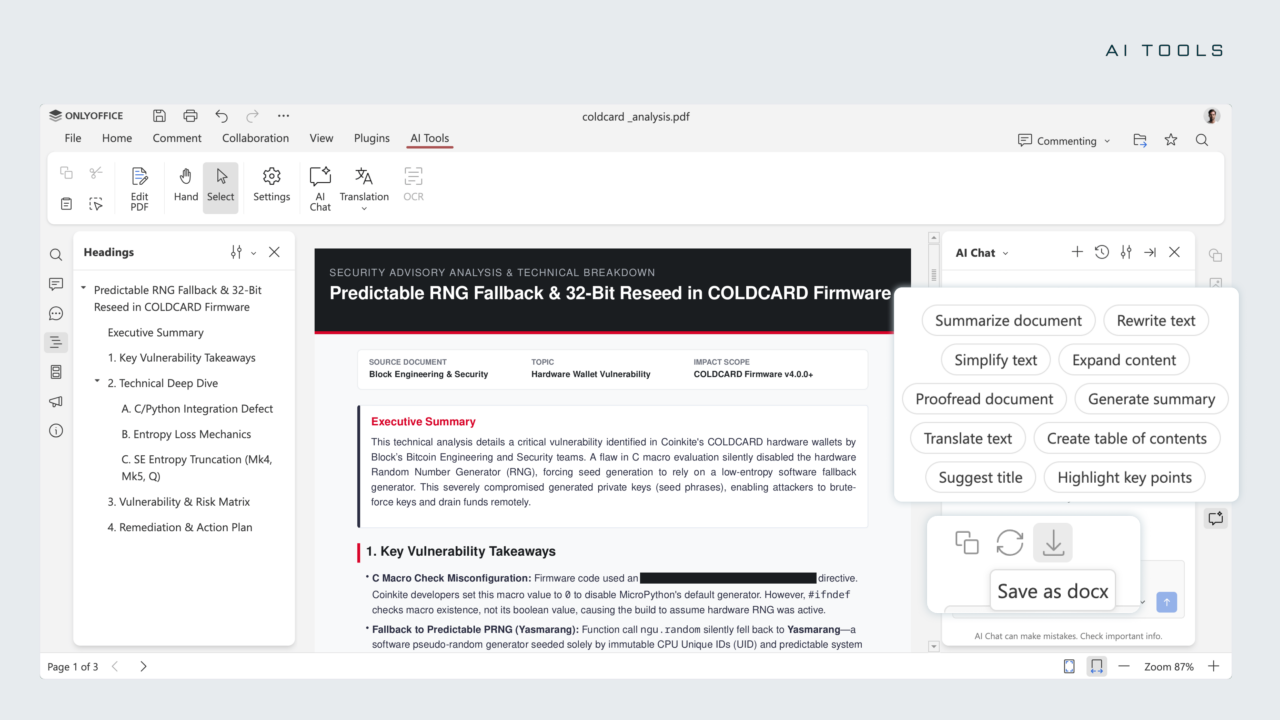
AI now lives in a dedicated AI Tools tab in every editor. It reads the context of the open file, so its suggestions match what's actually in your document rather than generic output.
Here's what each editor can do:
PDF Editor
Ask questions about the document and get direct answers
Generate a one-click summary
Draft emails based on the file's content
Redact sensitive information
Document Editor
Summarize, rewrite, or simplify long passages
Translate text in place
Proofread and highlight key points
Build a table of contents, suggest a title, and apply formatting automatically
Spreadsheet Editor
Generate formulas and explain how they work
Analyze datasets, spot trends, and build forecasts and Pivot Tables
Clean up inconsistent data, flag outliers, and fill in missing values
Presentation Editor
Create outlines and slide titles
Write bullet points and shape a storytelling flow
Generate speaker notes and visual ideas
Actions, assistants, and saved prompts
You can go beyond the default prompts with three building blocks:
| Feature | What it does |
|---|---|
| Quick AI actions | One-off tasks, like changing the tone of a paragraph |
| AI assistants | Run continuously and react to changes as you edit |
| Saved prompts | Reuse your favorite requests in AI Chat with one click |
Note: Quick AI actions and AI assistants are currently available in the Document Editor only.
Bring your own model
This is the part many self-hosters will care about most:
Cloud: top up your Wallet to enable the ONLYOFFICE AI service.
Server builds: connect any AI model, including local models. This is a big win for privacy-sensitive setups where data can't leave your infrastructure.
Both: set a default model and assign different models to specific tasks. For example, use one model for summarizing and another for formula generation.
⚠️ Heads-up for open-source users: Based on community feedback, built-in AI has been removed from the open-source versions. AI tools are now installed separately, so your base install stays lean.
Modular apps: Docs + Apps
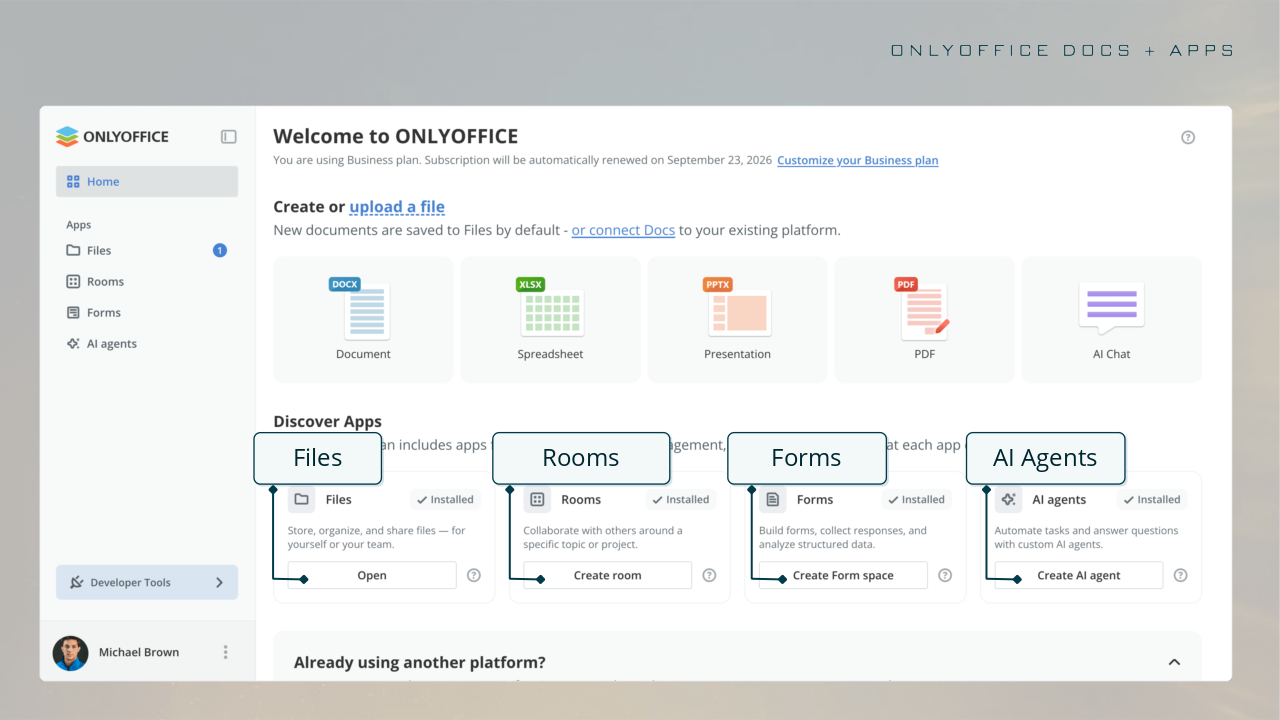
Version 10.0 replaces the single fixed workspace with modular apps you can mix and match:
AI agents
Forms
Rooms
Files
The idea is simple: shape the software around your workflow, not the other way around. Turn on only the apps you need, and skip the clutter you don't.
For integrators, the setup works in three steps:
Install the editors
Extend them with the apps you need
Integrate the package into your own solution
PDF Editor: more control, better privacy
A focused set of upgrades for anyone handling sensitive files:
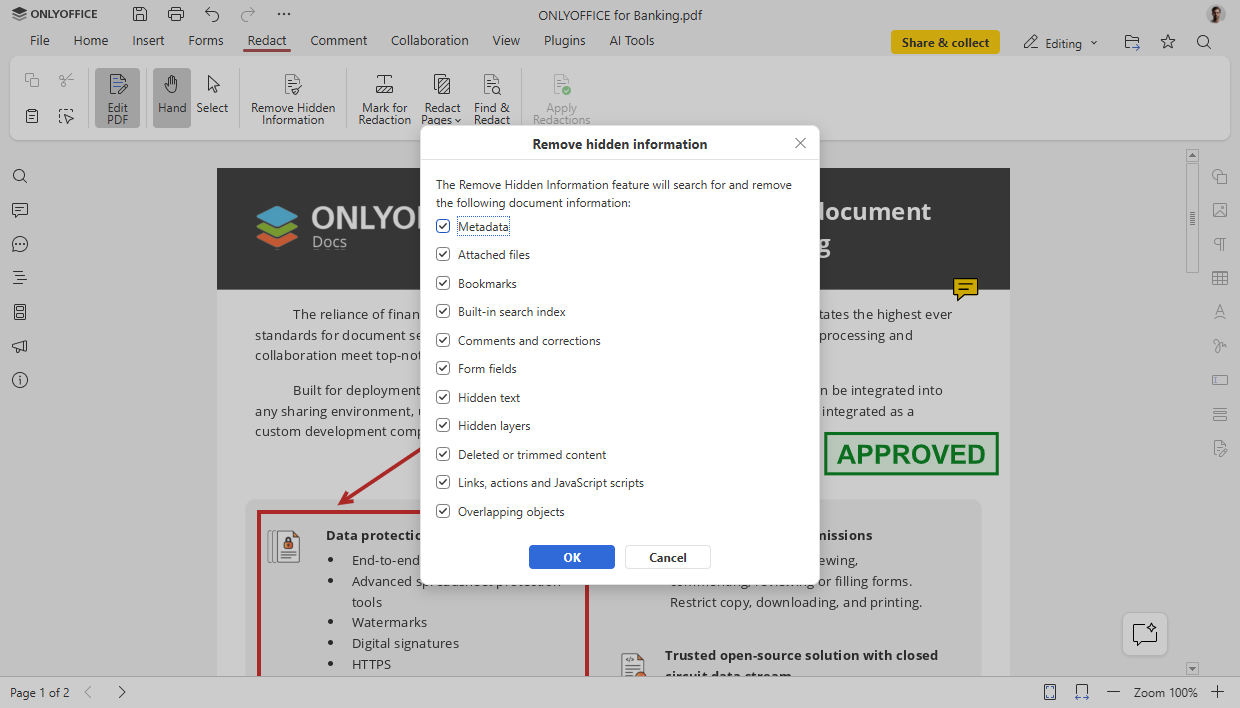
Remove metadata with Redact. Strip hidden information before you share a file. (Redact tab → Remove hidden information)
Automatic table recognition. When you use Edit Text on a PDF, tables are detected automatically. No more rebuilding rows and columns by hand. (Edit PDF)
Reusable signatures in forms. Save a signature once and apply it from your list whenever you need it. (Forms → Signature fields)
Signatures from the Comment tab. Sign right where you're already working.
Customizable annotations. Adjust border, background, and opacity.
Spell-check toggle for forms. Turn it on or off for each form field. (Forms → Field settings → Check spelling)
Document Editor: smoother co-editing and RTL fixes
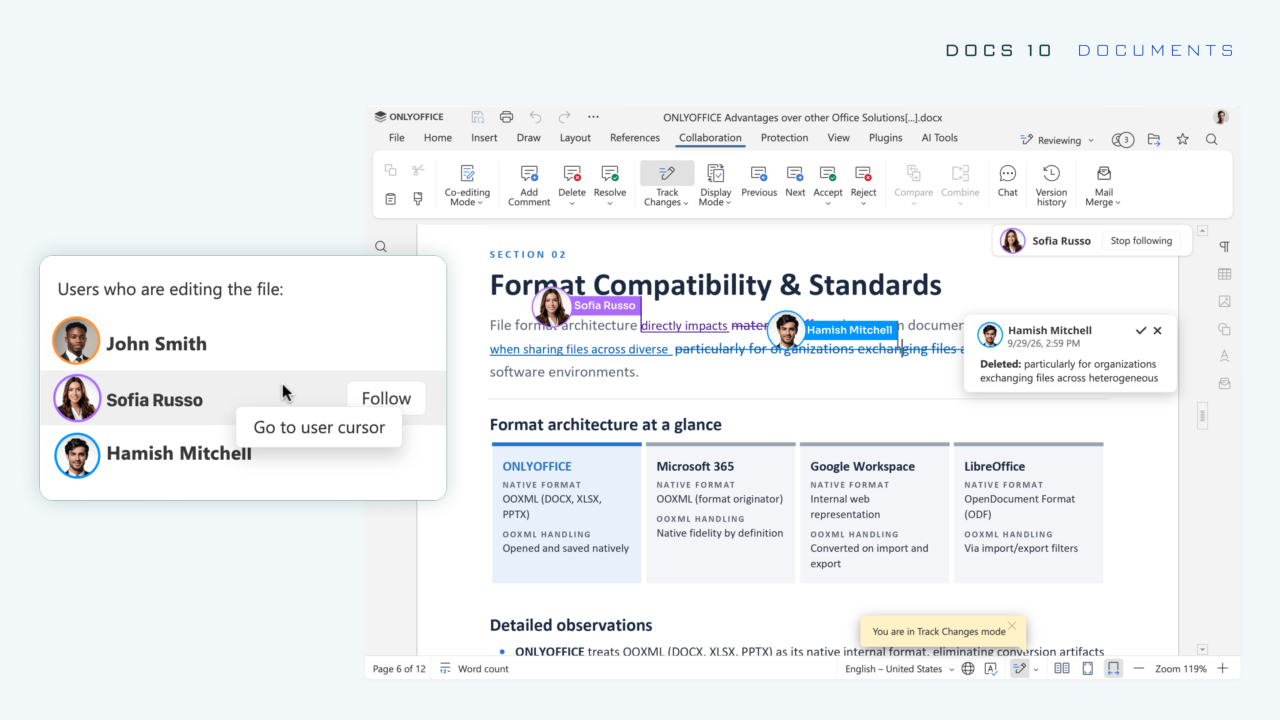
Follow a co-editor's cursor. During real-time collaboration, you can jump straight to a teammate's cursor and follow along as they edit. It makes pair-reviewing a spec or a README draft much easier.
(Users who are editing the file → Follow / Stop following)
Improved right-to-left (RTL) support. Graphical formulas and other inline objects now behave far more reliably in RTL documents. That's good news if you ship docs in Arabic, Hebrew, or other RTL languages.
Other formatting improvements:
Keep with next now works for tables, plus paragraphs and tables inside block content controls
Row breaking across pages lets long tables flow naturally
Horizontal Line settings window gives you fine-grained control
Line-based cropping handles content that overflows the line height
Spreadsheet Editor: faster under the hood
Performance is the headline here. Two key engineering changes:
Separated style and data storage. Formatting and cell values are stored independently.
Limited cell traversal. Each operation processes only the cells it actually needs.
In practice, that means less waiting and smoother handling of large workbooks.
The conditional aggregation functions most teams depend on have also been optimized:
SUMIF   AVERAGEIF   COUNTIFS   SUMIFS
AVERAGEIFS   MAXIFS   MINIFS
So heavy formulas like this one should finish faster on big sheets:
=SUMIFS(D2:D50000, A2:A50000, "EMEA", C2:C50000, ">=2026-01-01")
Usability upgrades round it out:
Function constant hints show which constants go where while you type
Formula range highlights make it easy to verify references at a glance
Animated selection marquee shows exactly what you copied or cut
Resize all cells at once with your mouse
AutoComplete toggle for cell values (File → Advanced Settings)
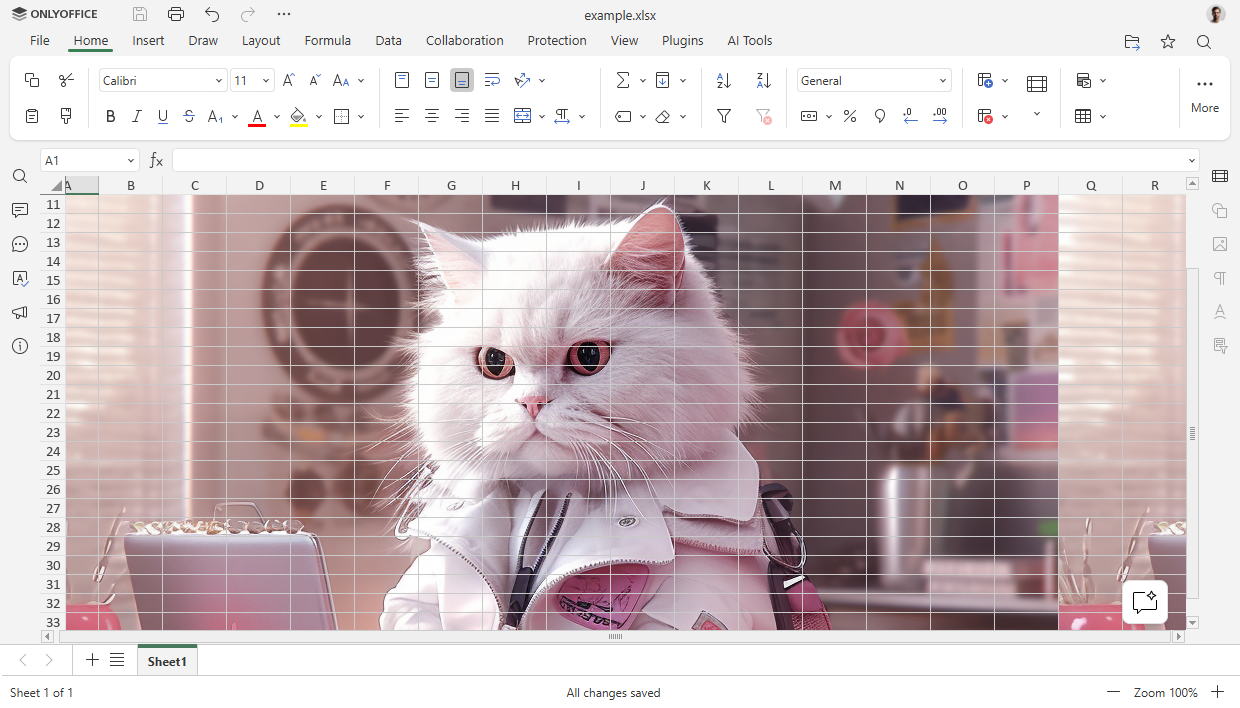
Sheet backgrounds now survive open and save cycles
Presentation Editor: new views and GIF/video export
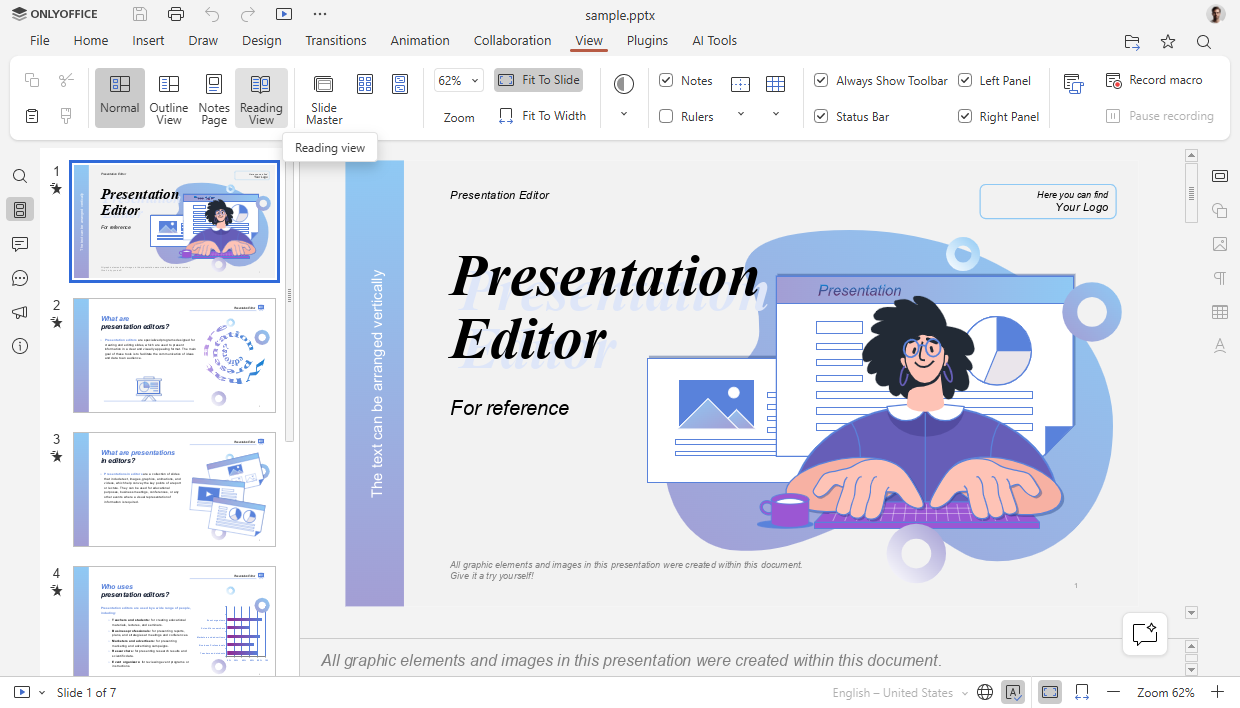
New display modes in the View tab:
Outline View
Reading View
Notes Page
Notes Master
Handout Master
Export as GIF or video. Turn a deck into a shareable clip for a release announcement, a demo, or a social post. (File → Download as)
Extended print settings. Print notes, handouts, and outlines. You can also include hidden slides, backgrounds, borders, comments, and slide numbers, and scale content to fit the page.
Formats, plugins, and extras
Format support
Open and convert
.ofdfilesSave spreadsheets in classic
.xls
Other additions
SVG to shape conversion. Turn an SVG into an editable shape.
Data Table support for charts, so you can show the numbers behind the visual.
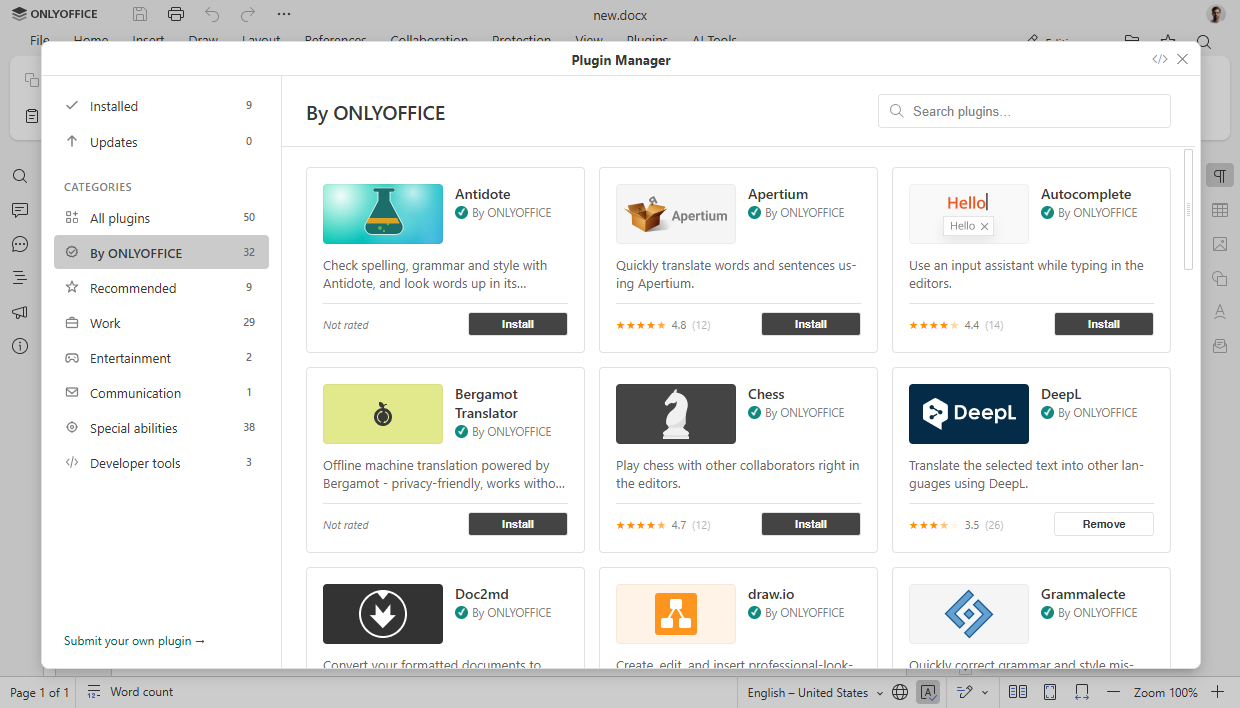
Redesigned Plugin Manager with a left-side category panel.
New community plugins
Antidote: spelling and grammar checks
Curly: reusable templates
Chinese Converter and Chinese Formatter
Salesforce: import and export data between Salesforce and spreadsheets
If you build plugins yourself, the cleaner Plugin Manager makes your work easier for users to find.
Security: ~35 vulnerabilities fixed
AI is also giving attackers new ways to find and exploit weaknesses. This release puts security at its core and addresses around 35 vulnerabilities. That makes the suite more resilient for teams handling confidential data at scale.
We'd love to hear what you think. Which feature are you most excited to try? Are you planning to plug in a local model? Tell us in the comments 👇


